
H5PROJECT — THE INTERACTIVE CLOUD FOR TEACHERS
Interactive learning materials in one place
H5Project is a platform for educators to easily create, manage, and share interactive learning materials.
H5Project also includes dedicated tools for language teaching, with strong support for multilingual content, including Hebrew and other right-to-left languages.
14 days free · No credit card required · Built-in Getting Started guide
H5Project, הענן האינטראקטיבי למורים
יצירת מגוון חומרי למידה אינטראקטיביים במקום אחד
H5Project הוא אתר לאנשי הוראה בו הם יכולים ליצור בקלות, לנהל ולשתף חומרי למידה אינטראקטיביים. כל החומרים נשמרים בספרייה הפרטית שלכם, כך שאפשר לערוך אותם, להשתמש בהם שוב, לשתף עם לומדים או עמיתים ולשלב אותם בקורסים ובמערכות למידה.
המערכת כוללת גם כלים ייעודיים להוראת שפות, בדגש על תמיכה בתוכן רב־לשוני, כולל עברית ושאר שפות מימין לשמאל.
14 יום בחינם · ללא כרטיס אשראי · מדריך התחלה מובנה
Main product screenshot placeholder
Replace with a real H5Project screenshot.
Technology in service of human interaction
טכנולוגיה בשירות האינטראקציה האנושית
Automatic feedback does not replace the teacher. It supports routine practice and gives learners an immediate response, leaving more classroom time for questions, explanation, interpretation, problem solving, shared thinking, and meaning-making.
המשוב האוטומטי אינו מחליף את המורה; הוא מלווה את התרגול השגרתי ונותן ללומדים מענה מיידי. כך המפגש בכיתה יכול להתמקד במה שהאינטראקציה האנושית מאפשרת: לשאול, להסביר, לפרש, לפתור בעיות, לחשוב יחד, להתמודד עם מורכבות ולבנות משמעות.
Practice with immediate feedback
תירגול עם משוב באווירה משחקית
Learning that is engaging and meaningful
למידה מהנה ומשמעותית
Learners practice, get immediate feedback, and learn from their mistakes. Interactive and game-based elements make practice more active, engaging, and enjoyable.
More effective practice means less class time spent on basic drills, homework checks, and corrections—and more time for discussion, collaboration, problem solving, critical thinking, and active use of language and knowledge.
הלומדים מתרגלים, מקבלים משוב מיידי, ולומדים מהטעויות. המִשְׂחָקִיּוֹת והאינטראקטיביות הופכות את התירגול למזמין, פעיל ומהנה יותר.
כשהתירגול יעיל ומשמעותי יותר, פחות מזמן השיעור צריך להיות מוקדש לתרגול בסיסי, לבדיקת שיעורי בית ולתיקון תרגילים. את הזמן הזה אפשר להשקיע בדיון, שיתוף פעולה, פתרון בעיות, חשיבה ביקורתית ושימוש פעיל בשפה ובידע.
Open to change
נכסי הוראה גמישים
Learning materials you can keep building on
פתוחים לשינויים — גם חומרי הלמידה
In H5Project, an activity stays editable instead of becoming a closed file. You can fix, change, expand, duplicate, adapt, and reuse it, or combine it with other content in a new interactive page or book.
Instead of a fixed learning resource, each activity can become a basis for further development. You can adapt, combine, expand, and improve it as your teaching and learners’ needs change—without starting over.
ב־H5Project הפעילות נשארת זמינה לעריכה ואינה הופכת לקובץ סגור. אפשר לתקן טעויות, לשנות, להרחיב, לשכפל, להעתיק חלקים ולשלב אותם בעמודים אחרים, להתאים לקבוצה אחרת ולשלב פעילויות ותכנים שונים בתוך עמוד או ספר אינטראקטיבי חדש.
כך, במקום חומרי למידה סגורים וקבועים, כל פעילות יכולה להיות בסיס להמשך הפיתוח, ולא מוצר סופי. אפשר לפרק, לשלב, להרחיב ולפתח את החומרים ככל שההוראה והצרכים משתנים — בלי להתחיל בכל פעם מאפס.

Create
יוצרים
Save in library
שומרים בספרייה

Available for use
זמין לשימוש
Adapt & extend
מתאימים ומרחיבים

Reuse
משתמשים שוב
More than 50 activity types
יותר מ־50 סוגי פעילויות
Variety, flexibility, and creative freedom
מגוון אפשרויות וחופש יצירתי
H5Project gives you access to a wide range of familiar H5P content types, adapted for RTL, so you can create rich, interactive learning experiences in Hebrew as well. You can combine text, images, audio, video, and different forms of interaction, and choose the activity type that best fits the learning goal—not the other way around.
You can create a single exercise, a page that combines several activities into one sequence, an interactive book with multiple pages, or even a complete online course. Even when the content is long and complex, learners receive one link that leads them to the entire activity.
H5Project נותן גישה למגוון רחב של סוגי התוכן המוכרים של H5P, בגרסאות מותאמות ל־RTL, כך שאפשר ליצור חוויות למידה אינטראקטיביות ועשירות גם בעברית. אפשר לשלב טקסט, תמונות, שמע, וידאו וסוגים שונים של אינטראקציה, ולבחור את סוג הפעילות לפי מטרת הלמידה — לא להפך.
אפשר ליצור תרגיל בודד, עמוד שמחבר כמה פעילויות לרצף אחד, ספר אינטראקטיבי של כמה עמודים ואפילו קורס מקוון שלם. גם כשהתוכן ארוך ומורכב, הלומדים מקבלים קישור אחד שמוביל לכל הפעילות. כך אפשר להתאים את המבנה, המדיה ורמת המורכבות למטרה ולקבוצה — מפעילות קצרה ועד יחידת למידה עשירה שמתאימה גם ללומדים מבוגרים.
 Dictation
איות משמע
Dictation
איות משמע
 Multiple Choice
שאלות ברירה
Multiple Choice
שאלות ברירה
 Find the Words
תפזורות
Find the Words
תפזורות
 Sort Paragraphs
רצף רעיונות
Sort Paragraphs
רצף רעיונות
 Memory Game
משחקי זיכרון
Memory Game
משחקי זיכרון
 Drag the Words
גרירת מילים
Drag the Words
גרירת מילים
 Image Sequence
רצף תמונות
Image Sequence
רצף תמונות
 Multimedia Choice
שאלות מולטימדיה
Multimedia Choice
שאלות מולטימדיה
 Drag and Drop
גרירה לתמונה
Drag and Drop
גרירה לתמונה
 Interactive Book
ספר אינטראקטיבי
Interactive Book
ספר אינטראקטיבי
 Crosswords
תשבץ
Crosswords
תשבץ
 Fill in the Blanks
השלמת מילים
Fill in the Blanks
השלמת מילים
 Interactive Video
סרטון אינטראקטיבי
Interactive Video
סרטון אינטראקטיבי
 Branching Scenario
דילמות בחירה
Branching Scenario
דילמות בחירה
 Game Map
מפת משחק
Game Map
מפת משחק
 Timeline
ציר זמן
Timeline
ציר זמן
 Flashcards
כרטיסיות
Flashcards
כרטיסיות
 Info Hotspots
נקודות מידע
Info Hotspots
נקודות מידע
Plus H5Project exclusives
וגם פעילויות בלעדיות ל־H5Project
Alongside familiar H5P content types, H5Project is developing an exclusive collection of activities and tools inspired by real needs that emerge from teaching and learning.
לצד סוגי התוכן המוכרים של H5P, ב־H5Project מתפתח אוסף בלעדי של פעילויות וכלים ייחודיים, שנבנים מתוך צרכים שעולים מהוראה ולמידה בפועל.
Otzar
אוֹצָר Otzar
Build vocabulary cards with text, audio, and illustrations. Spaced repetition helps learners review words over time and strengthen retention.
יוצרים במהירות כרטיסיות אוצר מילים עם טקסט, שמע ואיורים. מנגנון החזרה המרווחת מאפשר תרגול ברמת סט בודד או לאורך אוצר המילים כולו, וגם הלומדים יכולים ליצור כרטיסיות בעצמם ולהרחיב את ה”אוצר” שלהם.
Hebrew Handwriting
כתב יד עברי
Practice Hebrew handwriting with immediate feedback. The activity looks not only at the shape of the letter, but also at stroke direction and writing flow.
לימוד ותרגול של כתב יד בעברית עם משוב מיידי. הפעילות מתייחסת לא רק לצורת האות, אלא גם לתנועה ולכיוון הכתיבה, וניתן לשלב אותה עם סוגי תוכן נוספים של H5P.
Spot the Match
Find the common element between cards—matching or similar letters, words, images, or emojis. Difficulty can increase gradually, and the activity can be adapted to different content.
מזהים את האלמנט המשותף בין הקלפים — אות, מילה, תמונה או אימוג׳י זהים או דומים. רמת הקושי עולה בהדרגה, ואפשר להשתמש באיורים הקיימים או להעלות תוכן משלכם וליצור חפיסה חדשה
Guess Who?
נחש מי?
A question-and-description game for practicing vocabulary related to clothing, appearance, and describing people. Teachers can use prepared boards or create new ones with their own images.
משחק שאלות ותיאור לתרגול אוצר מילים של לבוש, הופעה ותיאור אנשים. אפשר להשתמש בלוחות מוכנים או ליצור לוח חדש עם תמונות משלכם — למשל של מורים או לומדים. המשחק המוכר, בלי הדפסות: פשוט שולחים קישור.
This or That
זה או זה?
Conversation cards that present two options and invite learners to choose, explain, and justify their choice. Images or other visual prompts can be added.
קלפי שיח שמציגים שתי אפשרויות ומזמינים את הלומדים לבחור, להסביר ולנמק את הבחירה. אפשר להוסיף תמונות, להשתמש בקלפים קיימים או ליצור במהירות סדרה חדשה משלכם.
Interactive Word Cloud
ענן מילים אינטראקטיבי
Ask an open question and let learners respond from their own devices. Their answers appear immediately on screen as a live word cloud.
מציגים שאלה פתוחה, והלומדים משיבים מהמכשירים שלהם. התשובות מופיעות מיד על המסך כענן מילים משותף, עם אפשרות לניקוד על כתיבה נכונה, רעיונות מקוריים או שניהם.
Built for multilingual learning
רב־לשוני, עם תמיכה מלאה ב-RTL
Right-to-left support that feels natural
תוכן אינטראקטיבי בכל שפה — גם מימין לשמאל
H5Project supports interactive content in multiple languages. In Hebrew, Arabic, and other right-to-left languages, the experience should feel natural—not like a left-to-right interface that was simply flipped.
Navigation, arrows, buttons, punctuation, mixed-language content, and reading direction all need to work together consistently.
Switching to RTL in H5Project is especially simple: one click applies the adjustment, and H5P content types are adapted for right-to-left use both in the interface and inside the activity.
H5Project נועד ליצירת תוכן אינטראקטיבי במגוון שפות. בעברית, ערבית ובשפות אחרות הנכתבות מימין לשמאל — RTL, כלומר Right to Left — ההתאמה הנדרשת היא הרבה מעבר ליישור הטקסט.
כיוון הניווט, החצים, הכפתורים, הפיסוק, שילוב בין שפות וכיוון הכתיבה והקריאה צריכים כולם להתנהג נכון. ב־H5Project המעבר ל־RTL פשוט במיוחד — לחיצה אחת מפעילה את ההתאמה, וסוגי התוכן של H5P מותאמים לעבודה מימין לשמאל גם ברמת הממשק וגם בתוך הפעילות עצמה.
Simple access for learners
למידה בלי חסמים
Open the activity and start learning
קליק – ומתחילים ללמוד
Sharing is simple: the teacher sends a link or QR code, and learners open the activity directly in their browser on a computer, tablet, or phone.
השיתוף פשוט ומהיר: המורה שולח קישור או QR לפעילות, והלומדים פותחים אותה ישירות בדפדפן — במחשב, בטלפון או בטאבלט.
There is no need to register, install an app, or pay, and there are no ads. Learners can focus on the activity instead of the system around it.
אין צורך בהרשמה, בהתקנת אפליקציה או בתשלום, ואין פרסומות שמפריעות בדרך. כך הדרך אל הפעילות נשארת קצרה ופשוטה, והלומדים יכולים להתרכז בתוכן במקום במערכת שמסביב.
Fewer steps and distractions make it easier to focus on learning. The link stays available, so learners can return later for more practice, review, or independent learning.
פחות שלבים ופחות הסחות דעת מאפשרים להתרכז במה שחשוב — בלמידה עצמה. הקישור נשאר זמין גם אחרי השיעור, כך שהלומדים יכולים לחזור לפעילות בכל רגע לתרגול נוסף, לחזרה או ללמידה עצמאית.
In class
שולחים
The activity link or QR code is always available to the teacher and easy to share—no searching for files, exporting, or uploading again.
הקישור או ה־QR לפעילות זמינים למורה ונוחים לשיתוף — בלי לחפש קבצים, לייצא או להעלות מחדש.
At home
פותחים
Learners open the activity directly in the browser—without registration, app installation, payment, or ads.
הלומדים נכנסים ישירות בדפדפן — בלי הרשמה, בלי התקנת אפליקציה, בלי תשלום ובלי פרסומות.
Later
ואם צריך – חוזרים
The link stays available, so learners can return later for more practice, review, or independent learning.
הקישור נשאר זמין, כך שאפשר לחזור לפעילות בהמשך לתרגול נוסף, לחזרה או ללמידה עצמאית.
Easy to see results
קל לראות תוצאות
“Class”: an ongoing learning space
“כיתה”: מסגרת למידה מאורגנת
A lesson is part of the learning process, but learning continues over time. In H5Project, you can create a “Class” for one learner or a group and bring together the activities, information, and links they need. Each Class has a permanent link with current and previous activities, Zoom links, resources, and supporting materials. Learners sign in with an email address and password.
For the teacher, there is no need to send a new link for every activity. The Class link is shared once and remains the fixed access point. You can also see who participated in each activity and what their results were. Before the next lesson, the teacher can review participation and results, decide what needs revisiting, and what can be left behind. An activity can belong to a Class while still being shared separately with learners who are not identified in the system.
שיעור הוא חלק מתהליך למידה, אבל הלמידה נמשכת לאורך זמן. לכן ב־H5Project אפשר ליצור “כיתה” עבור לומד יחיד או קבוצה, ולרכז בה את הפעילויות, המידע והקישורים שמלווים את הלמידה. לכל “כיתה” יש קישור קבוע, שבו הלומדים מוצאים פעילויות חדשות וישנות, קישורים לזום, מקורות וחומרי עזר. כדי להיכנס ולהיות מזוהים במערכת, הם מתחברים באמצעות כתובת מייל וסיסמה.
עבור המורה, המשמעות היא שלא צריך לשלוח קישור חדש לכל פעילות. משתפים פעם אחת את קישור ה“כיתה”, והוא נשאר נקודת הגישה הקבועה לחומרי הלמידה. בנוסף, אפשר לראות מי השתתף בכל פעילות ומה היו התוצאות שלו בה. לפני השיעור הבא המורה יכול לבדוק את ההשתתפות והתוצאות, להבין על מה כדאי לחזור ומה אפשר כבר להשאיר מאחור. כל פעילות יכולה להשתייך למספר “כיתות”, ובמקביל אפשר להמשיך לשתף אותה גם עם לומדים שאינם מזוהים.
Participation
השתתפות
Who completed the activity, and who still has no result?
מי ביצע את הפעילות ומי עדיין ללא תוצאה?
Results
תוצאות
What were the results? Visible to teacher and learner.
מה תוצאות הפעילות?
שקיפות למורה וללומד
Next steps
מסקנות
What needs review? Is it time to move on?
על מה כדאי לחזור?
האם כדאי להתקדם?
Works with your existing learning platform
משתלב במערכת הלמידה של המוסד
Connect H5Project to your LMS
H5Project גם לבתי ספר ואוניברסיטאות
LMS stands for Learning Management System—a platform used to manage teaching and learning. Systems such as Moodle, Canvas, and Google Classroom help organize courses, assignments, learners, and grades.
LMS הוא קיצור של Learning Management System — מערכת לניהול למידה. מערכות כמו Moodle, Canvas ו־Google Classroom משמשות בתי ספר, אוניברסיטאות וארגונים לניהול קורסים, חומרי לימוד, משימות וציונים.
Integrating H5Project makes it possible to enrich existing courses with more interactive, engaging activities. Instead of relying only on files and static assignments, teachers can add practice with immediate feedback, media, and interaction—and reduce the time spent checking exercises manually.
שילוב של H5Project מאפשר להעשיר את הקורסים הקיימים בפעילויות אינטראקטיביות, עשירות ומהנות יותר. במקום להסתמך רק על קבצים ומשימות סטטיות, אפשר לשלב תרגול עם משוב מיידי, מדיה ואינטראקציה — ולצמצם את הזמן שמורים משקיעים בבדיקה ידנית של תרגילים.
H5Project connects to systems such as Moodle through the LTI standard, so there is no need to develop a separate integration for each institution. Learners open the activity as part of their course in the LMS.
החיבור למערכות כמו Moodle נעשה באמצעות תקן LTI, כך שאין צורך לפתח חיבור מיוחד לכל מוסד. לאחר הגדרה ראשונית, H5Project מופיע במערכת ככלי חיצוני שממנו ניתן לבחור פעילויות ולשלב אותן ישירות בקורס.
Depending on the teacher’s settings and the capabilities of the LMS, results can be checked automatically and returned to the course gradebook.
הלומדים פותחים את הפעילות כחלק מהקורס דרך מערכת ה-LMS. בהתאם להגדרות המורה – התוצאה יכולה לחזור אוטומטית למערכת הלמידה ולהופיע לצד שאר ציוני הקורס.
Choose an activity
בוחרים פעילות
Choose the H5Project activity you want to use in the course.
בוחרים מתוך H5Project את הפעילות שרוצים לשלב בקורס.
Add it to the course
מוסיפים לקורס
Add the activity directly to Moodle or another compatible LMS.
משלבים את הפעילות ישירות ב־Moodle או במערכת LMS תואמת אחרת.
Learners complete it
הלומדים מבצעים
Learners open and complete it from inside the course.
הלומדים פותחים את הפעילות בתוך הקורס ומבצעים אותה.
Grades sync back
הציונים חוזרים אוטומטית
The result can be checked automatically and synchronized with the LMS gradebook.
התוצאה יכולה להיבדק אוטומטית ולהסתנכרן עם ספר הציונים של מערכת הלמידה.
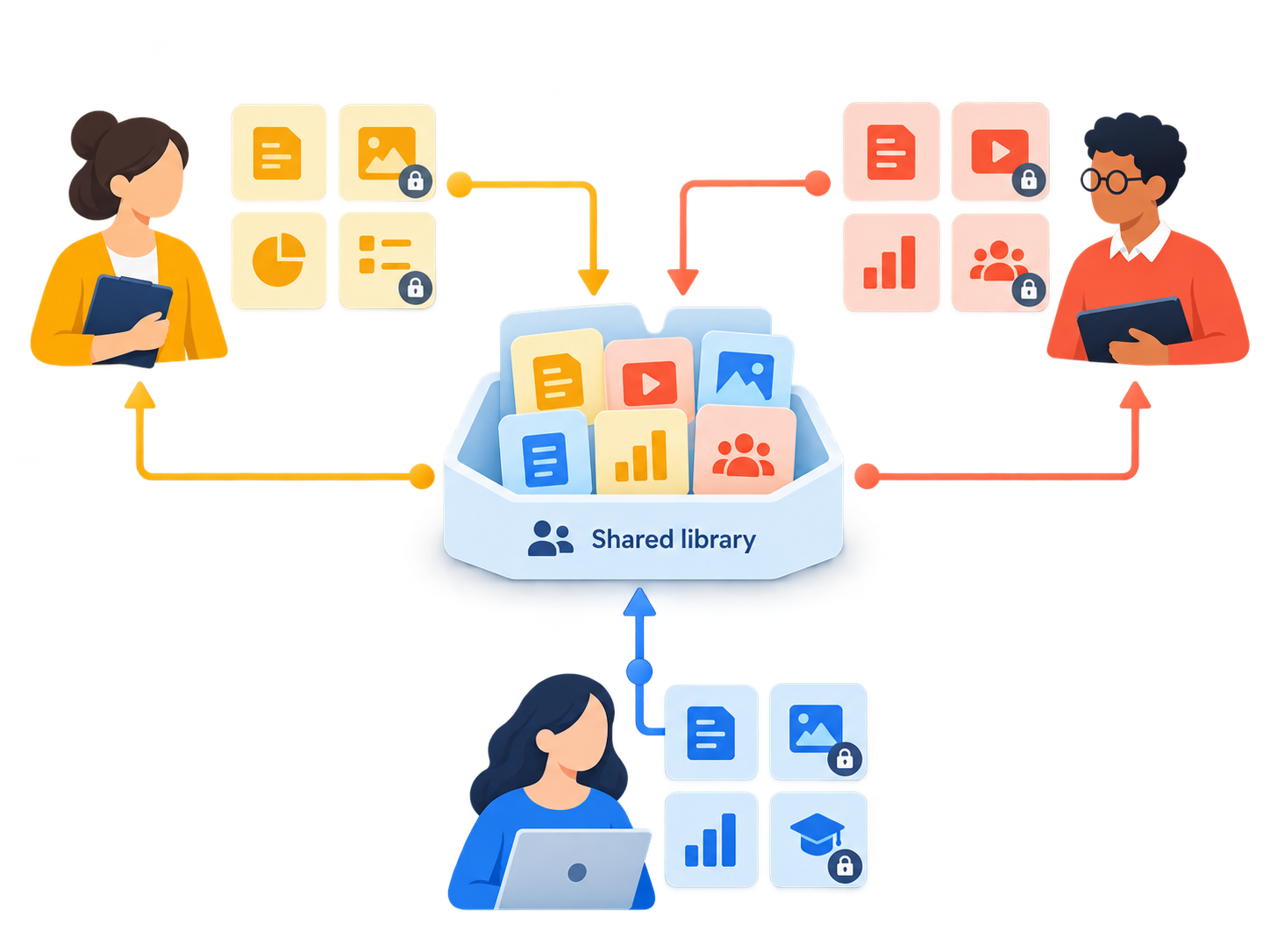
Each teacher chooses which materials stay private and which are shared with the team.
כל מורה בוחר אילו חומרים יישארו פרטיים ואילו ישותפו עם הצוות.
Create and share together
שיתופי פעולה והשראה בין מורים
A shared workspace for teachers
עובדים יחד בלי לוותר על הספרייה האישית
Any teacher can create a team and invite others—colleagues, friends, or teachers who have organized around a subject, school, or shared project.
כל מורה יכול להקים צוות ולהזמין אליו אחרים — קולגות, חברים או מורים שהתארגנו סביב תחום עניין משותף. אין הגדרה אחת ל״צוות״: זו פשוט מסגרת לשיתוף, השראה ועבודה משותפת.
Each teacher keeps a personal library and decides which materials remain private and which are shared with the team. With one click, an H5P activity can be shared with the team, and depending on permissions, team members can view, use, copy, or edit it.
לכל מורה נשארת ספרייה אישית, והוא מחליט אילו חומרים לשמור לעצמו ואילו לשתף. השיתוף פשוט במיוחד: בלחיצת כפתור אפשר לשתף פעילות H5P עם הצוות, ובהתאם להרשאות חברי הצוות יכולים לצפות, להשתמש, להעתיק או לערוך אותה. כך אפשר להמשיך לפתח חומר שכבר קיים במקום להתחיל מחדש.
This saves time, makes it easier to learn from one another, and helps build a growing shared collection of activities and ideas. Permissions can be changed at any time.
כך חוסכים זמן, לומדים זה מזה ובונים יחד מאגר מתפתח של פעילויות ורעיונות. בכל רגע אפשר לשנות את רמת השיתוף או להפסיק אותו, כך שהשליטה בחומרים נשארת בידי המורה. בשלב זה, השיתוף בצוותים מיועד לחומרי H5P בלבד.
Learning through creation
למידה מבוססת תוצר — PBL
When the project becomes part of the learning
הזדמנויות חדשות לפרויקטים יצירתיים
Learning does not have to end with the correct answer. In H5Project, learners can create interactive products of their own—combining text, images, audio, video, and interaction to present what they have learned.
A product like this can be the culmination of a learning process: choosing what matters, organizing information, building a story, explaining, making decisions—and presenting the project.
Here, knowledge does not remain only information to remember. It becomes material for creation, interpretation, and personal expression. Technology becomes a tool for thinking, communicating, and showing understanding.
למידה לא חייבת להסתיים בתשובה נכונה. ב־H5Project הלומדים יכולים ליצור תוצרים אינטראקטיביים משלהם — סיור וירטואלי, סרטון אינטראקטיבי, מפת ידע, דילמות מסתעפות או תוצר אחר — ולהשתמש ברכיבים האינטראקטיביים בשילוב מולטימדיה כדי להביע רעיון בקול אישי.
תוצר כזה יכול להיות שיא של תהליך למידה: לבחור מה חשוב, לארגן מידע, לבנות סיפור, להסביר, לקבל החלטות — ולבסוף להציג את הפרויקט.
כאן הידע אינו נשאר רק מידע שצריך לזכור, אלא הופך לחומר ליצירה, לפרשנות ולביטוי אישי. הטכנולוגיה האינטראקטיבי הופכת את הידע המופשט לצורה, ואת היצירתיות לקול אישי — וכך היצירה עצמה הופכת לחלק מהלמידה.
Example project: a virtual tour of Petra, Jordan
תוצר לדוגמה: סיור וירוטאלי בפטרה, ירדן
Built from real teaching
נבנה על ידי מורֶה
Created from classroom needs
פתרונות מעשיים לבעיות אמיתיות בכיתה
H5Project is developed through everyday teaching practice. Many of its tools and activities began with a simple question: how can this learning task be made clearer, more interactive, or easier to use in a real classroom?
Development continues through real use and feedback from teaching. When a new need comes up, it can become a problem to solve: a new activity, template, workflow, or feature.
Missing a tool? Get in touch and suggest a new activity, template, or feature.
H5Project מפותח מתוך עבודה יומיומית בהוראה. הרבה מהכלים והפעילויות התחילו משאלה פשוטה: איך אפשר לפתור בעיה שחוזרת בכיתה, לחסוך זמן, לתת ללומדים דרך טובה יותר לתרגל — או להפוך רעיון פדגוגי לפעילות אינטראקטיבית שעובדת בפועל?
הפיתוח ממשיך מתוך שימוש אמיתי ומשוב מהוראה. כשעולה צורך חדש, אפשר לחשוב עליו כבעיה לפתרון: לבדוק רעיון, לבנות כלי, לנסות אותו עם לומדים ולשפר אותו לאורך זמן.
חסר לכם כלי? אפשר ליצור קשר ולהציע פעילות, תבנית או יכולת חדשה.
Portrait / classroom image placeholder
Replace with a real photo when ready.
Try H5Project
מתחילים בקלות
Start with 14 days free
14 יום בחינם, בלי כרטיס אשראי
Create an account with your email address and get 14 days to try H5Project.
No credit card details are required.
After creating your account, you can use the built-in Getting Started guide to learn the main actions and get started quickly.
פותחים חשבון באמצעות כתובת דוא״ל בלבד ומקבלים 14 ימי התנסות ב-H5Project.
אין צורך להזין פרטי כרטיס אשראי.
מיד לאחר פתיחת החשבון תוכלו להשתמש במדריך ההתחלה המובנה, שמציג את הפעולות המרכזיות במערכת ומפנה למדריכים מפורטים כשצריך.